Home / Bentley Lifecycle Policy

Bentley Lifecycle Policy

Bentley Lifecycle Policy

Consistent lifecycle and support terms for Bentley's applications and services

Fixed Lifecycle Policy​

Time-bound version support lifecycle for desktop and client-server applications.

Have questions about our policy?

Overview

What are we doing and why are we doing it?

At Bentley, we are committed to continuously improving the quality of our products and services. To support these efforts, we are introducing a Fixed Lifecycle Policy that defines the gradual retirement of older versions of many of our products.

This policy provides clearly defined lifecycle and support terms explaining how available technical support and maintenance services will change through the course of the application lifecycle. Adopting this Fixed Lifecycle Policy will enable Bentley users to better plan for major version upgrades while staying current with security and performance updates.

To get the very best out of your software, we always recommend using the latest version.

What is the scope of this policy?

This policy replaces previous Bentley Support Policies, including the Desktop Applications Support Policy, ProjectWise Support Policy, and License Administration Services Support Policy. The policy does not cover Bentley MANAGEservices and Cloud Services that are managed by Bentley.

What are the current user rights and expectations?

Over time, Bentley has offered different software licensing models. Below is a consolidated description of what is offered now and the rights of users:

EntitlementUser rights
Perpetual License with Active SELECT/E365/EPS Subscription, or Subscription-Only License
  • Obtain installation files and dependencies for the application, including the latest version.
  • License the software with a valid entitlement on at least one machine.
  • Request technical support.
Perpetual License with No Active SELECT/E365/EPS Subscription
  • Obtain installation files for the last version covered by previous subscription.*
  • License the software on a single machine, no pooling.

Empty heading

* – subject to availability

What are the key changes to the previous Bentley Support Policy?

This policy introduces changes to our application versioning methodology and provides details on our new version support lifecycle, including an updated list of technical support and maintenance services.

Application Versioning

What are the changes to application versioning?

Starting January 1, 2023, an updated versioning will be used for new versions of Bentley applications covered by this policy. This includes use of version types and associated version compatibility assurances, as well as changes to the release cadence, version naming and number, as detailed below.

What are the version types?

The following table outlines different version types. 

Version type Description
Major version A version that may include major new features, major enhancements, and other significant changes including user experience, workflow, and compatibility. Major versions may support side-by-side installation, enabling users to run multiple versions of the application on the same machine to facilitate easier migration to a more recent version.
Minor version A version that may add minor new features or enhancements and address issues that have been found in the software such as performance, stability, or security issues. Minor versions are released for the supported versions of the application. A minor version always replaces an earlier release of the same major version.

Empty heading

What are application support phases?
An application support phase defines the phase of the application support lifecycle. The following table outlines different phases.
Application Support Phase Description
Continuous Support At least a single major version has been released and the application is actively developed with new major or minor version releases planned in the future.
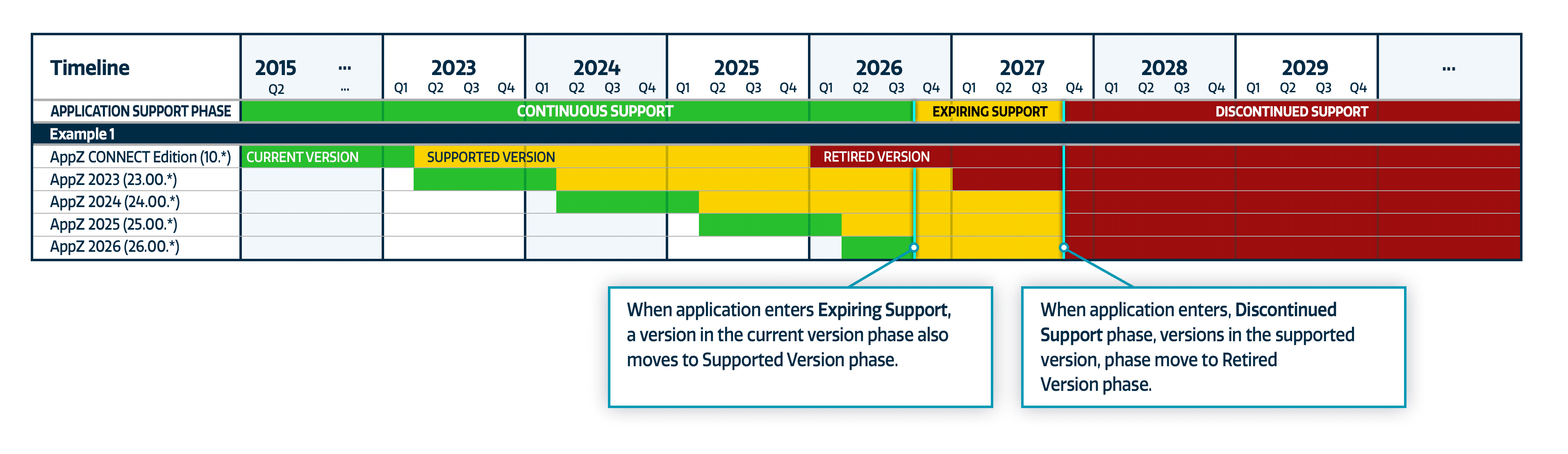
Expiring Support Application has reached the end of the Continuous Support phase, with no new major version releases planned in the future and the date for entering Discontinued Support has been specified, at least 12 months from the date when an application has entered Expiring Support.
Discontinued Support Application has reached the end of its support lifecycle and is no longer supported.

Empty heading

Version Support Lifecycle

What are version support phases?

A version support phase defines the phase of the support lifecycle of a major version. All minor versions are supported in the same version support phase as the major version they apply to. The following table outlines different phases.

What are the version types?

The following table outlines different version types.

Version Support Phase Description
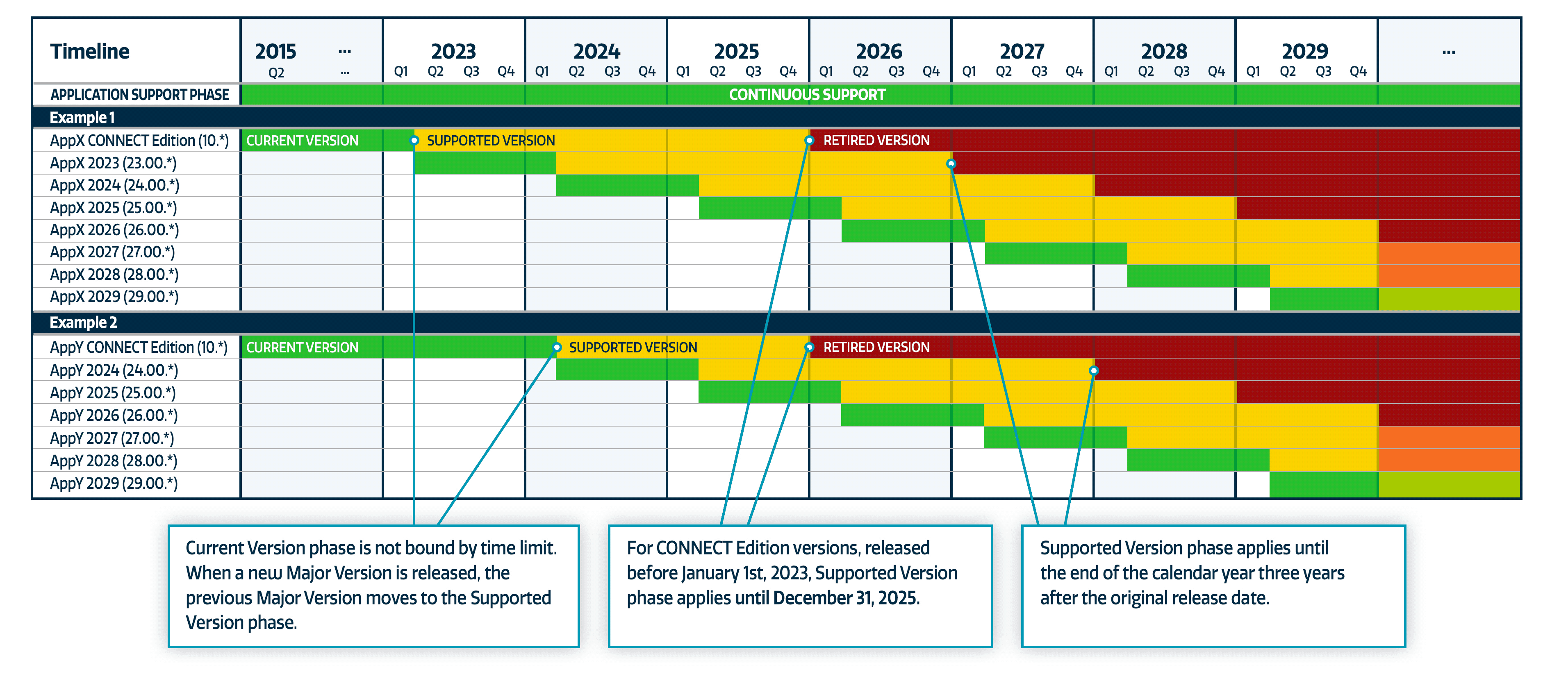
Current Version This phase applies to the most recent major version of the application in the Continuous Support phase. Current version phase is not bound by time limit. When a new major version is released, the previous major version moves to the Supported Version phase. When an application enters the Expiring Support phase, a release in the Current Version phase also moves to the Supported Version phase.
Supported Version This phase applies to major versions until the end of the calendar year, 3 years after the original release date.* The Supported Version phase will be extended as necessary to ensure it applies to a major version for a period of at least 12 months. When an application enters the Discontinued Support phase, all versions in the Supported Version phase move to the Retired Version phase.
Retired Version This is the final phase that applies to major versions at the completion of the Supported Version phase.

Empty heading

* – For CONNECT Edition versions released prior to January 1, 2023, the Supported Version phase applies until December 31, 2025 at the earliest.

What are the technical support and maintenance services included with each of the version support phases?

To be eligible for support, including technical support and maintenance services, the version must be installed and run on an operating system that it has been certified for and is supported by an operating system vendor. If a vendor discontinues support for an operating system, support for Bentley application versions running on that operating system is also discontinued, irrespective of the version support phase. The same considerations apply for the version of the Runtime Environment (such as Microsoft .NET Framework, Python, Node.js®, or Java) and the Database Management System (such as Microsoft SQL Server, PostgreSQL, or MySQL) that the application is running on or interfacing with.

The technical support and maintenance services included with each version support phase are detailed in the tables below.

Technical support services Current Version Supported Version Retired Version
Online support resources
Online learning content
Phone and email support
Service request submittal

Empty heading

Maintenance services Current Version Supported Version Retired Version
New features
Enhancements
Maintenance fixes*
New environment certification

Empty heading

✓ – Included
* – Bentley at its discretion prioritizes resolution of defects and deficiencies found in the software based on the impact to the users and various other criteria.

FAQs

Our users operate on a global scale, delivering security-critical projects across all areas of infrastructure design, engineering, and operations. Project delivery regulations continuously evolve, and right now—as we accelerate enabling digital transformation for multiple workflows—it is paramount that our Bentley Support Policy remains current. Many aspects of our industry, company, and user base lead to this update, including, but not limited to the following:

  • The importance of information and cyber security is paramount. Only by continuously monitoring the fast-evolving threat landscape and updating the software as necessary to stay ahead, we can ensure that our users are protected in every step of a project lifecycle, from exchanging files in the design phase to operations of critical infrastructure assets.
  • The length of time a product version remains supported and available in the market has a strong correlation with the potential security risks associated with that version. Hence, time-bound application version support lifecycle is necessary for evolving security risks to be effectively managed and mitigated, while providing users a clear timeline to plan major upgrades.
  • As we continuously expand and improve our portfolio of infrastructure engineering software, to keep providing our users comprehensive and clearly defined support expectations, we need to occasionally update the terms and conditions on what we support and how we do it.
  • A closer alignment with industry best practices will enable our users to better manage Bentley applications within their software portfolios as well as enable Bentley to better utilize a growing ecosystem of technologies and services by third-party vendors to improve our offerings.

Technical support describes the methods by which the user can contact Bentley’s Technical Support department and the level of assistance that one can expect to receive.

Maintenance describes the types of software updates the user can expect to receive for a version, depending on a version support phase that applies to it. Version support phases will be further defined in the sections below.

The following table outlines compatibility categories.

Compatibility categoryDescription
Data backward compatibilityData created with previous versions is supported without loss of fidelity
API compatibilityNo breaking API changes
Cross-application compatibilityNo items removed from the list of supported versions of other Bentley and third-party applications (e.g., supported ProjectWise Design Integration versions)
OS compatibilityNo items removed from the list of certified operating systems

Empty heading

Compatibility assurances for each version type are detailed in the table below.

Version typeData backward compatibilityAPI compatibilityCross-application compatibilityOS compatibility
Major version✓*PPP
Minor version

Empty heading

– Included
P – Breaking changes may be occasionally introduced. Supporting documentation and upgrade assistance tools (if necessary) will be provided with any breaking changes to make the process of upgrading as simple and streamlined as possible.
* – Occasionally, may require an automated or user-assisted file format/database schema conversion.

Version release cadence defines how often application versions are released.

As part of our application versioning changes, for most of the applications covered by this policy, we are adopting an annual release cadence (i.e., a single major version release per calendar year). The number and cadence of minor version releases may vary.

As part of our application versioning changes, Bentley is moving to a more consistent version naming and version number scheme. One notable aspect of this is the use of the calendar year of the original release date, helping users to easily determine the support timeframe for the version.

Application Version Name is defined in the following form: <Application name> <Major version>
Version name part Description
<Application name> Full name of the application. E.g., “OpenRoads Designer.”
<Major version> Name of the major version in the form <YYYY> [Update <N>], where:
  • YYYY – major version year. Calendar year of the original release date.
  • N – major version sequence number. Used when releasing multiple major versions per year and specifies sequential number of the version within the year. The value starts with “0” for the first major release. Included in the name starting with the second major version, i.e., staring with the value “1.”
Example: The first major version release in 2023 is named “2023.” The second major version released in the same calendar year is named “2023 Update 1” and so on.
Application Version Number consists of 4 parts, where each part is a zero-padded number and is defined in the following form: AA.BB.CC.DD The following table outlines a convention for version number parts.
Version number part Description
AA.BB First two version number parts correspond to a major version, where:
  • AA – last two digits of the major version year,
  • BB – major version sequence number.
CC Minor version number. Value is reset to “00” when incrementing AA or BB.
DD Build number. Value is reset “01” when incrementing any other version part.
Examples
Version number part Description Description
MicroStation 2023 23.00.00.102
  • Major version – 2023
  • Build – 102
MicroStation 2023 23.00.02.42
  • Major version – 2023
  • Minor version – 2
  • Build – 42
MicroStation 2023 Update 1 23.01.00.99
  • Major version – 2023 Update 1
  • Build – 99
MicroStation 2023 Update 2 23.02.03.07
  • Major version – 2023 Update 2
  • Minor version – 3
  • Build – 7

CONNECT Edition versions released prior to January 1, 2023, will be supported at least until December 31, 2025*. For applications with a less frequent release cadence, the support period may be extended beyond December 31, 2025, to ensure that CONNECT Edition versions released prior to January 1, 2023, are supported for at least 12 months after the release date of the next major version.

* – If an application enters Expiring Support before December 31, 2024, the support period will last until the end of the Expiring Support phase, which may be prior to December 31, 2025.

V8i SELECTseries 10 reached end of support on December 31, 2021, concluding support discontinuation for V8i and earlier generation versions. Please see our prior announcement on this change for more information here.

There are no changes to the support status for these versions.

Examples 1 & 2: Version Support phase transitions for an application in the Continuous Support phase
Bentley Lifecycle Policy table

Example 3: Version Support phase transitions for an application in the Continuous Support phase
Bentley Lifecycle Policy table

Continuous Lifecycle Policy

Continuous support lifecycle for services and applications that are managed by Bentley and supported continuously

Have questions about our policy?

Overview

What is Bentley’s Continuous Lifecycle Policy?

This policy describes delivery of support and maintenance for Bentley’s continuously delivered applications and cloud services (the Covered Services). It is designed to provide a predictable and transparent framework that enables rapid innovation, enhances security, and ensures our users benefit from the latest features and performance improvements.

This policy pertains to Covered Services designed with a single, evolving version stream, in contrast to the Bentley Fixed Lifecycle Policy, which governs applications with discrete major versions.

What is the scope of this policy?

The Covered Services include the following categories:

  • Bentley-Hosted Software: Services, applications, and web-based portals where Bentley manages the hosting environment and software updates.
  • Modern Desktop Applications: Desktop applications designed for and delivered with a continuous update mechanism and a single version stream.
  • Mobile Applications: All Bentley mobile applications distributed through public application stores (e.g., Apple App Store, Google Play Store).

This policy complements the Bentley Fixed Lifecycle Policy. Bentley products not explicitly covered by this or other policies, are governed by the Fixed Lifecycle Policy.

What are the Covered Service Support Phases?

The end-to-end lifecycle of a Covered Service is managed through distinct support phases to ensure clarity and predictability from inception to retirement.

Phase Description
Early Access From time to time, Bentley may provide Covered Services or features for evaluation and feedback purposes. These are not intended for production use, are subject to change without notice, and are excluded from any service level agreements (SLAs) or formal support obligations.
Continuous Support The active production phase where the Covered Service is production-ready, stable, and fully covered by applicable SLAs and/or support obligations. This phase represents the period of active innovation and delivery. It includes two delivery states:
  • Limited Availability (LA): Access is restricted to a select group of users at Bentley’s discretion for controlled rollout or strategic validation.
  • General Availability (GA): Access is open to all eligible users.
Expiring Support The service has reached the end of its active innovation phase and enters a transition period where support is limited to critical maintenance and security updates.
Discontinued Support The final phase where a Covered Service has reached the end of its lifecycle. The service is no longer accessible, supported, or maintained by Bentley. For applications that rely on cloud-based services for functionality, those services may be terminated, which may cause the application to cease functioning.

Empty heading

How are Covered Services Retired?

When a Covered Service in Continuous Support phase is scheduled for retirement, Bentley will provide a clear, multi-stage process to ensure a smooth transition:

  1. Transition to Expiring Support: Bentley will provide a public notice before a Covered Service moves to Discontinued Support. While Bentley targets a minimum notice period of 12 months, this timeframe may be adjusted based on security requirements, third-party vendor changes, or the nature of the service. Notice will be communicated via email to account administrators, including through in-product notifications where applicable, and on the Bentley support website.
  2. Subscription Rights and Successors: Active subscriptions entitle users to supported services within their entitlement category but do not guarantee the perpetual availability of a specific service. Active subscribers may use the Covered Service until their current subscription term ends or the final transition date to Discontinued Support, whichever comes first. Bentley will strive to identify a successor service or migration path with comparable or enhanced functionality.
  3. Discontinued Support (End of Life): On the final retirement date, the Covered Service reaches the end of its lifecycle. For Bentley-hosted services, the environment will be decommissioned; for mobile and desktop applications, cloud-reliant functionality (such as licensing or data processing) may be terminated, which may cause the application to cease functioning.
  4. Data Retrieval Period: Upon the transition to Discontinued Support, the ability to retrieve or export data is governed by the terms and timelines established in the Bentley Service Level Agreement (SLA). Bentley will provide instructions and, where feasible, tools to assist users in exporting data in a standard format during this period.
What Support and Maintenance Services are Available?

Bentley provides support and maintenance for Covered Services to ensure they remain secure and functional. The level of service provided depends on the lifecycle phase of the service.

Provision of Support and Maintenance Services

While a Covered Service is in the Continuous Support phase, Bentley provides technical support and maintenance services in accordance with the account’s relevant enterprise license agreement, including access to technical support resources, the application of security updates, and the delivery of performance and maintenance fixes.

Covered Services in the Expiring Support phase continue to receive technical support and critical security/maintenance fixes but are generally excluded from new feature delivery and functional enhancements.

Stay Current Requirement

Support is provided exclusively for the current version of the Covered Service.

  • Bentley-Hosted Services: For services with managed rollouts, the supported version is the one provisioned by Bentley in the user’s environment. Updates are applied automatically by Bentley.
  • All Other Covered Services: For Modern Desktop and Mobile Applications, the supported version is the latest publicly available version. For these services, users are responsible for accepting updates as they are delivered. To ensure that technical assistance is conducted on the most stable version – including the most recent security updates and performance improvements – updating to the latest version is the first step in providing technical support for any encountered issue.

Supported End-User Environment

The user is responsible for maintaining a supported environment to ensure the security and performance of the Covered Service. This includes:

  • Minimum Requirements: Meeting the published minimum software and hardware requirements for the Covered Service.
  • Third-Party Components: Ensuring that third-party components required for the operation of the Covered Service (such as operating systems and web browsers) are actively supported by their respective vendors.

If an end-user environment is not maintained according to these requirements, Bentley is not obligated to provide technical support or apply Service Level Agreements (SLAs) for issues related to the unsupported environment.

FAQs

The distinction lies in the versioning model and how updates are managed.

  • The Fixed Lifecycle Policy applies to applications with discrete major versions where users install and manage specific versions on their own infrastructure and control their own update schedules.
  • The Continuous Lifecycle Policy applies to all Bentley-Hosted Services (where Bentley manages the environment and updates), as well as applications designed with a single, evolving version stream (such as Mobile and certain Desktop applications).

In the Continuous model, support and maintenance are focused on the version provisioned by Bentley or the latest version made available to the user.

The categories in the “Scope” section of each policy provide general guidance. For installable products, the governing lifecycle policy is typically indicated on the Bentley Software Downloads page. If a product is not listed, or for definitive confirmation, a service request, or Case, may be submitted through the Bentley Support Portal

The Continuous Lifecycle Policy is based on a single, evolving version stream. Consequently, the first step in providing technical assistance for any encountered issue is to update to the latest version. This ensures the investigation is conducted on the most stable version of the software, which already includes the most recent security updates, performance improvements, and maintenance fixes.

Updates undergo a comprehensive validation process prior to release to ensure stability and performance. In the event that a critical issue is encountered following an update, certain applications include mechanisms to temporarily return to a previous stable state. This is intended as a short-term safety measure while the underlying issue is addressed. Bentley Technical Support is available to help investigate and resolve reported issues to ensure service continuity.

Bentley-hosted environments are decommissioned at this stage. For Desktop and Mobile applications, continued operation depends on the level of reliance on cloud-based components; the termination of these components may cause an application to cease functioning. Transition plans typically identify a successor service or a migration path intended to provide comparable or enhanced functionality.

As Bentley modernizes its portfolio, certain products may transition from a discrete versioning model to a continuous delivery model. In these instances, a transition plan is established, and a target minimum of 12 months’ advance notice is provided to ensure users have adequate time to adjust to the new lifecycle framework.

The applicable policy is determined by the hosting and management model:

  • Bentley-Managed: Applications hosted and managed by Bentley, including legacy Managed Services environments, are governed by the Continuous Lifecycle Policy. In these instances, support is focused on the version provisioned by Bentley within the user’s environment.
  • User-Managed: Applications installed and managed by the user within their own infrastructure are governed by the Fixed Lifecycle Policy or the Continuous Lifecycle Policy (for Modern Desktop Applications). To confirm which policy applies to a specific product, users should check the Bentley Software Downloads page or submit a service request, or Case, via the Bentley Support Portal as outlined above in FAQ #2.

No. APIs, software libraries, and developer tools are out of scope for this policy. These services often follow distinct development cycles and may provide their own lifecycle definitions. For example, iTwin Services lifecycle information can be found at the iTwin Developer Portal.

No. All Seequent applications and services are currently out of scope for this policy. Seequent desktop applications continue to be governed by the Seequent Desktop Software Version Support Policy, while Seequent cloud-based services are governed by the Service Level Agreement for Seequent Cloud Based Products.

20% Off Bentley Software

Deal Ends Friday

Use Coupon Code "THANKS24"