

SEP 10, 2026
Work Smarter in MicroStation: How AI Becomes Your Daily Design Sidekick
Alan O'Grady, Senior Product Marketing Manager
Key Takeaways
- Bentley Copilot gives MicroStation users in-context help so they can solve drafting questions without leaving their design workflow.
- Bentley Copilot eases the shift from AutoCAD to MicroStation by translating familiar commands and reducing platform-switching friction.
- Bentley Copilot can help teams catch standards issues earlier and speed up reporting tasks while keeping engineers in control of review and validation.
- Bentley MCP Servers connect AI assistants such as Claude, and GitHub Copilot to Bentley software, reducing context switching.
- Python Assistant helps MicroStation users automate repetitive CAD tasks with natural-language prompts instead of traditional macro development.
The CAD and BIM world is flooded with hype around AI "features." But as a modeler, drafter, or project manager working on real-world infrastructure projects, you don't want extra AI tools to manage. You want to empower your existing tools to make your daily drafting smoother, eliminate friction, and help you get quality models out the door faster.
Many firms are adopting AI, but the real power comes down to how you use it every day on the drafting table. Working alongside AI isn't about replacing your engineering judgment; it's about removing friction between your ideas and the software.
In this guide, we'll look at how Bentley Copilot, Bentley MCP Servers, and Python Assistant directly solve everyday CAD headaches, from translating tricky AutoCAD commands to automating repetitive drawing setups and getting instant answers when you're stuck on a complex 3D shape.
Availability status: Bentley Copilot and Python Assistant are Technology Preview features. Bentley MCP Servers are available through an Early Access waiting list.
Bentley Copilot on the Drafting Table
1. Ditching the "I'm Stuck" Bottleneck & Overcoming Language Barriers
Whether you’re new to MicroStation or joining a complex project with tight deadlines, getting stuck on a tool or workflow can break your concentration. In traditional workflows, you might spend 20 minutes searching documentation or forums, or wait until a senior team member is available to answer your question.
Example: You need to place a cell from the correct project library but cannot remember how to attach it. Ask Bentley Copilot, “How do I attach and use a cell library in MicroStation?” It guides you through the process without interrupting your work.
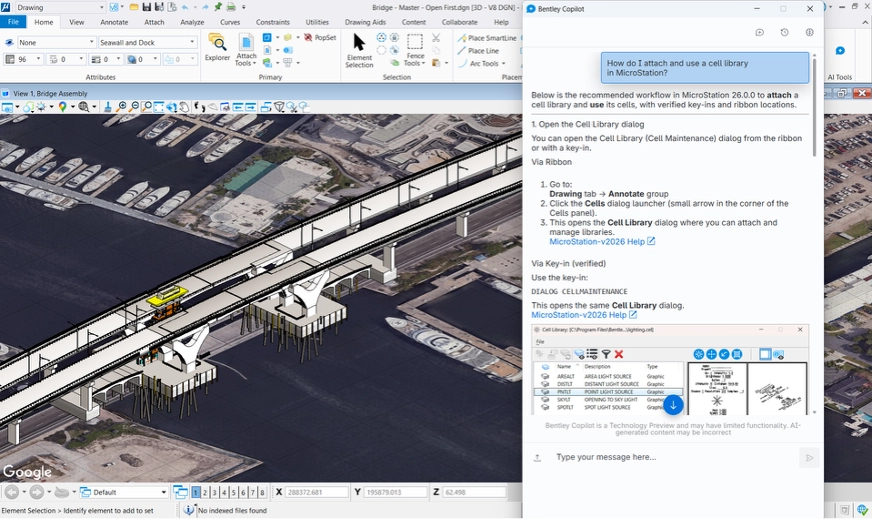
Bentley Copilot acts as an instant, in-context mentor directly inside your design environment.
On-the-Spot Troubleshooting: Ask Copilot how to construct complex 3D geometries, apply specific cell libraries, or navigate real-world location workflows right when you need it, keeping your momentum uninterrupted.
Faster, Easier Knowledge Sharing: Junior drafters can get up to speed without repeatedly interrupting senior engineers, helping everyone stay focused on their core tasks.
Instant Answers in Your Native Language: Working across global teams, or prefer guidance in your native language? Copilot supports multilingual interactions, including English, 中文, हिन्दी, Español, العربية, Français, বাংলা, Português, Bahasa Indonesia, اُردُو, and many more. This makes technical knowledge accessible with less risk of translation confusion.
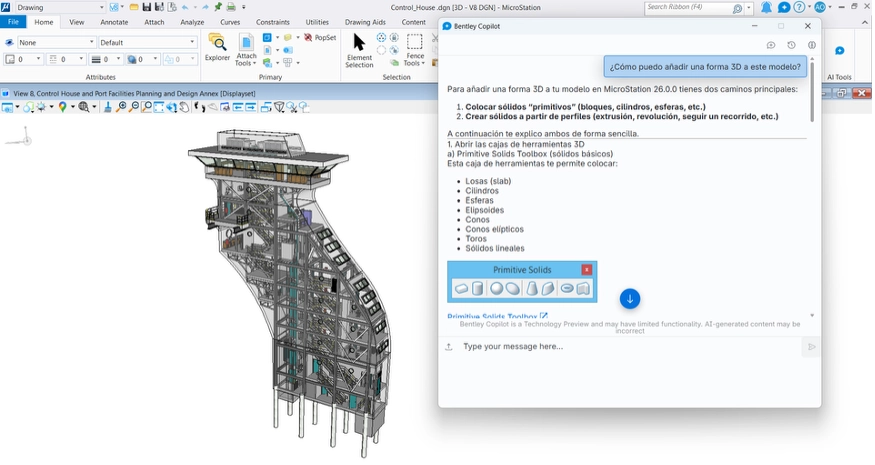
Example: A designer asks Bentley Copilot,
- “ 如何从这个轮廓创建 3D 模型?”
- “ इस प्रोफ़ाइल से 3D मॉडल कैसे बनाएँ? ”
- “ ¿Cómo puedo crear un modelo 3D a partir de este perfil? ”
… and Bentley Copilot responds with step-by-step guidance in their preferred language, without requiring translation.
What You Gain Daily:
• Less time waiting for help from colleagues
• Stress-free onboarding for new team members and software tools
• Clear guidance in your preferred language
2. Apply Your AutoCAD Knowledge Easily
If your fingers know AutoCAD keyboard shortcuts by heart, switching to or working in MicroStation can feel like wearing shoes on the wrong feet. Searching through ribbons to find equivalent tools or re-learning familiar commands wastes time and causes mental fatigue.
Bentley Copilot bridges the platform gap effortlessly.
Instead of forcing you to re-learn every single step from scratch, Copilot lets you type what you want to achieve in plain English (or reference AutoCAD commands you already know). It instantly points you to the exact MicroStation tool, command, or workflow required.
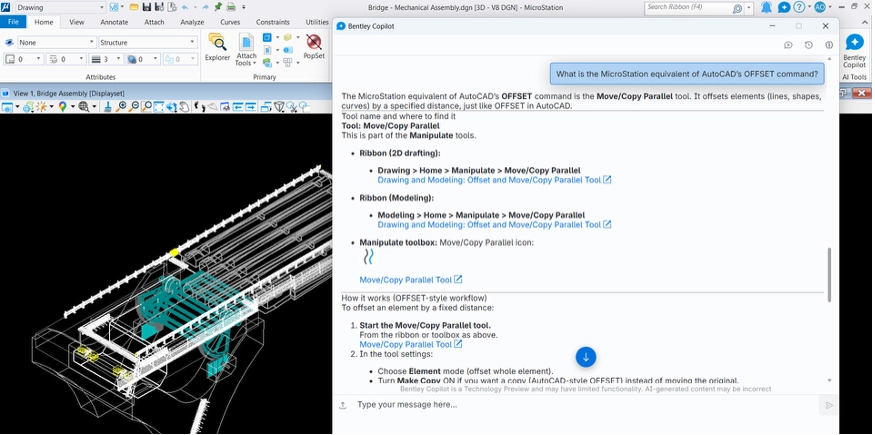
Example: You normally type OFFSET in AutoCAD but cannot find the equivalent in MicroStation. Ask Bentley Copilot, “What is the MicroStation equivalent of AutoCAD’s OFFSET command?” It points you to the Move Parallel tool and explains how to use it.
What You Gain Daily:
- Instant command and shortcut translation
- Drastically reduced mental fatigue during platform switches
- Confidence when moving between client-mandated CAD platforms
3. Catching Errors Before Your Boss (or Client) Does
Nothing is more frustrating than submitting a sheet set only to have it kicked back for minor standards violations, missing levels, or incorrect line weights. Fixing errors late in the design phase leads to late-night rework and unnecessary stress.
Bentley Copilot acts as your personal quality assurance safety net.
By helping you verify project standards and check compliance early in your design process, Copilot catches anomalies while you are still working on the model.
Example: Before issuing a PDF sheet set, ask Bentley Copilot, “Check this PDF against our project standards and flag any missing levels or incorrect line weights.” It highlights potential issues for you to review before submission.
What You Gain Daily:
- Fewer late-night fixes right before project submittals
- Consistent, compliant drawing sets every single time
- Total confidence when handing off models for review
4. Eliminating Boring Data Gathering and Reporting
Compiling quantity takeoffs, gathering element properties, or formatting sheet lists for project managers takes time away from actual modeling and design. While necessary, these administrative tasks consume hours of valuable drafting time.
Bentley Copilot streamlines reporting directly from your model data.
Instead of manually counting elements or pulling properties into external spreadsheets, you can ask Copilot to assist with reporting workflows, instantly surfacing project information and generating structured summaries. Bentley Copilot accelerates the process, while you retain control by reviewing and validating the results.
What You Gain Daily:
- Significant time saved on repetitive administrative CAD work
- Quick answers to project manager questions without leaving your drawing
- More uninterrupted time dedicated to high-value design and modeling
Proof of Concept: See Bentley Copilot in Action
Want to see how it works in real MicroStation sessions? Check out these quick demonstrations:
| Daily Workflow Challenge | Practical AI Application | Demo Video |
|---|---|---|
| Multi-Language & Onboarding | Getting instant guidance in your preferred language and learning new CAD tools on the fly. | Onboarding Demo Multi-Language AI |
| AutoCAD to MicroStation Shift | Translating familiar AutoCAD shortcuts and commands seamlessly. | Platform Migration Demo |
| Standards & Quality Verification | Catching drawing anomalies and verifying CAD standards before submission. | Standards Verification |
| Model Reporting & Data Extraction | Extracting data and generating project reports without manual counting. | Reporting Workflows |
Bringing Your Favorite AI Tools into MicroStation (via MCP)
You may already use AI assistants such as Microsoft Copilot, Claude, or GitHub Copilot in your browser, development environment, or productivity applications. However, switching between your CAD application and external AI tools to copy coordinates, code, or project specifications disrupts the workflow.
With Bentley MCP (Model Context Protocol) Servers, you can connect standard AI assistants directly to your Bentley design environment, including MicroStation, Seequent Evo, STAAD.Pro, and ProjectWise.
Claude for Complex Data Analysis: Ask natural-language questions about complex project datasets, geotechnical specs, or structural models to get immediate, clear summaries.
GitHub Copilot for Power Users & BIM Managers: Generate custom scripts and integrations directly for Bentley APIs without spending days writing code from scratch.
What You Gain Daily:
- Use your favorite AI assistants without leaving your engineering context
- Reduce repetitive copying and pasting between CAD applications and web browsers
- Combine daily collaboration tools with live design data
Automating Repetitive CAD Tasks with Python Assistant
Every CAD user has tasks they wish they could automate: renaming hundreds of levels, batch-updating cell tags, or setting up standard sheet layouts. In the past, creating custom VBA or C# macros required advanced programming skills that most drafters and engineers simply didn't have time to learn.
Python Assistant lowers the coding barrier.
Python Assistant helps you create Python-based automations inside MicroStation using natural-language prompts. Describe the repetitive task you want to streamline, then use the assistant to generate and run a script in your CAD session. Review and test the generated script before applying it to production project data.
What You Gain Daily:
- Turn hours of repetitive clicking into single-click automations
- No computer science degree required: build scripts using plain English.
- Standardize repetitive team tasks across entire project folders
Proof of Concept: Multi-Assistant Integrations & Python Automations
Explore how open AI connections and Python scripting work in daily engineering workflows:
| Workflow Focus | Practical Daily Application | Demo Videos |
|---|---|---|
| Connecting Other AI Assistants (Bentley MCP) | Accessing deep engineering data through Claude and GitHub Copilot directly inside your workflows. | MicroStation MCP Integrations |
| Automating Repetitive Drafting (Python Assistant) | Generating custom local automations in MicroStation to streamline manual drafting and design processes. | Watch Automation with Python Assistant |
Your Personal AI Superpower on the Job?
AI isn't here to replace your creativity, technical expertise, or engineering judgment. It can reduce the repetitive and frustrating parts of CAD work, giving you more time to focus on designing and delivering infrastructure.
By building your AI literacy in the tools you already use, you can learn to ask better questions, test automated scripts, and verify AI responses against your professional experience. These habits turn AI into a personal productivity multiplier.
Whether it's shaving 30 minutes off a report, instantly translating an AutoCAD workflow, or automating a boring batch drawing update, the true value of AI is giving you back time in your workday.